
SharePoint accessibility widget
Install the EqualWeb accessibility widget on SharePoint in minutes - 5 short steps add AI-powered WCAG 2.2, ADA and EAA remediation and 9 accessibility profiles to any SharePoint site.
How to install EqualWeb on SharePoint
Enhance the accessibility and compliance of your SharePoint website with EqualWeb! Installing EqualWeb on your SharePoint website is a simple process that can greatly improve its accessibility and support compliance. With our solutions and services, you can create an inclusive digital experience for all users.
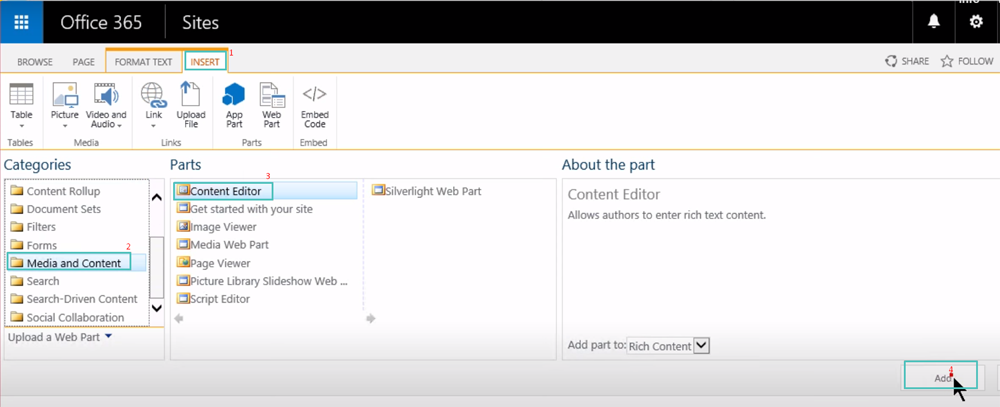
- Add a Content Editor web part to the page.
- (Click on the link to add new content, if you are using a web part page.)
- Click on the Edit Source button in the ribbon.
- Paste your JavaScript code in the HTML source.
- Apply and save the page.
Your EqualWeb installation code is waiting in your account - start a 7-day free trial or log in to copy it.
The same EqualWeb widget, on SharePoint
EqualWeb's Accessibility Widget is an AI-powered accessibility solution that automatically remediates WCAG 2.2, ADA and EAA issues on any website and adds a profile-based accessibility menu - installed with one line of code.
Remediation is aligned with the W3C Web Content Accessibility Guidelines (WCAG) 2.2, the technical standard behind the ADA, the European Accessibility Act and most accessibility laws worldwide.